Using Thai in Email, part 3
Writing Thai Email
In order to write an email in Thai you need to make sure that your email client knows that your message is in Thai. It may be possible to identify your email as being Thai by selecting the coding from the menu:
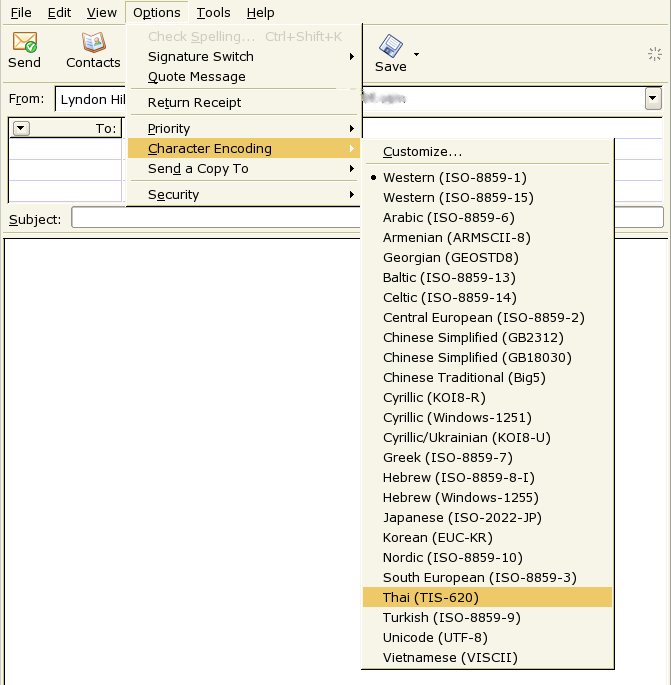
Setting the coding in Thunderbird.
This should add an appropriate MIME header to your email to identify the type. The client may also switch to a font suitable for viewing your message properly.
Adding a Header to Identify Your Email as Thai
If it is not possible to tell your client your email is Thai then you need to
manually modify or add the Content-Type header to the email. In some
email clients you can add this header:
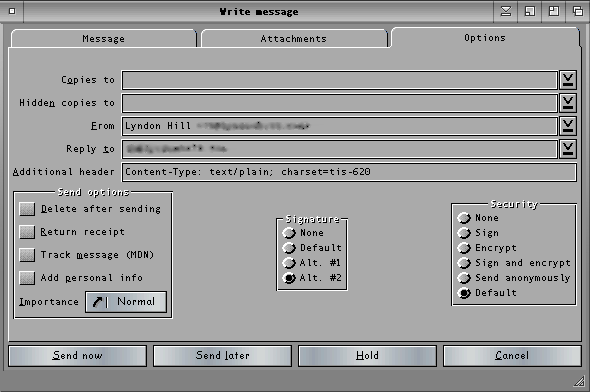
Adding an additional header in YAM.
Also see the section on Thai MIME headers.
Sending email with Webmail
At this time, none of the webmailers seem to support user selectable character codings. Using Yahoo I have successfully sent UTF-8 and HTML to other Yahoo accounts but when I sent it to Hotmail it was transcoded or the HTML was quoted. If you enter UTF-8 text, the mail webserver is prone to convert it to something else.
So how do we send email, confident that it will get through ? The only way is to write your message and attach it: this will avoid transcoding. It means the receiver must save the attachment and open it in an editor in order to view it. Writing a quoted reply is also awkward.
Conclusions
- If you use an email client then you can (probably) select the correct character coding and send Thai in the correct format. If you are sending Thai email you should be sure to add a MIME header.
- If you are using webmail then the only way to be sure that the other person is going to be able to read your email is by sending it as an attachment.
- Webmailers like Yahoo and Hotmail need to smarten up and start adding more support for other languages, the ability to select the coding would be a big step in the right direction.
- If you are suffering, then maybe my editor Sontana can help rescue your messages. If it can't help then you will probably have to learn a bit more about character codings.