Simultaneous Localisation and Mapping (SLAM)
Introduction
SLAM is typically used for robot perception and autonomous vehicle navigation as it can be used for building 3D world maps quickly. The algorithm processes sensor data online, determining the pose of the sensor while incrementally building a model of the environment. It is well suited to multithreaded implementation on modern computers.
Visual SLAM refers to a variant of SLAM that uses either monocular images, stereo images or images from an RGB-D camera. SLAM variants may use other sensing modalities such as LIDAR and SONAR. Algorithms that support Inertial Measurement Units (IMU) use the term inertial, e.g. VI-SLAM, Visual Inertial SLAM.
The Difference between Visual SLAM and Structure from Motion
Visual SLAM (VSLAM) processes video frame by frame so tracking is easier as feature points have moved only a small amount. SLAM will only keep keyframes for map building rather than use all the frames. Frequent optimisation is employed to keep the map accurate, but sometimes incorrect matching can result in propagated errors that can be difficult to automatically recover from. Ensuring that the path the sensor travels frequently crosses previous locations can give rise to constraints that limit the amount of drift. When these crossing points occur they are known as Loop Closures (LC). The online nature allows the sensor to be controlled interactively which can be important in unknown environments.
Structure from Motion (SfM) processes all frames offline and the order of images may be random. COLMAP can find it difficult to choose which images to use as a starting point but it does have features such as additional matching and manually choice of initial images for difficult cases. Because SfM is designed as an offline operation, there is an opportunity for human review of the images that are used to build the model.
Metrics
What makes a good SLAM algorithm?
- Processing Speed: Most algorithms are real-time
- Robustness: Tolerance to low texture environments, fast motion, poor lighting, occlusions, lens flare
- Absolute Trajectory Error (ATE): Measures accuracy by comparing location at the end of a reconstruction compared to a ground truth
Pros
- Live/fast allows interactivity: spot errors in model earlier and move sensor to capture more frames in that area to correct
- Does not need to load all images at start
- Stop as soon as enough detail is captured: ensure completeness of the model and the model is not oversampled
- Relocalisation: robots can recover known pose from a lost position
- Determine 3D poses and 3D world points
Cons
- Overoptimised but can get stuck in minima
- Map will drift over time without regular Loop Closure
- Lack of texture and reflective surfaces remain challenging (even non visual sensors can suffer these problems)
SLAM Algorithms
In this section, the key points of two of the current best SLAM algorithms are very briefly described.
ORB-SLAM 3
ORB-SLAM 3 is a complete SLAM system based on the previous ORB-SLAM algorithms that use ORB features to build a covisibility graph to manage tracking and matching. If the system loses localisation, a bag of words database is used to find the most similar keyframe position on the map.
A feature called Atlas manages multiple maps: if the system takes too long to relocalise, processing can continue by starting a new map and then looking for similarities between maps. If a similarity is found then the maps are merged. Atlas allows for multi session capability; either extending maps created previously or using multiple robots to collaboratively build a single map.
ORB-SLAM 3 is a classical algorithm and often used as a reference comparison when evaluating new techniques.
DROID-SLAM
DROID-SLAM is a deep learning based SLAM. It builds a dense map while estimating camera poses using a feature extraction network and dense bundle adjustment. Recurrent iterative optimisation is used (the same authors also wrote the RAFT paper explored in my optical flow demonstration).
Using dense learned features to keep optical flow based tracking of features and a learned update that maps flow to pose and dense depth updates results in a method that is neither direct or indirect. Similar to ORB-SLAM, a frame graph represents visibility between frames. If the camera revisits a region then edges are added to the graph for Loop Closure.
If all the processes are run on the same GPU then the result is deterministic. ORB-SLAM and many other classical SLAM algorithms cannot produce a deterministic result because they use RANSAC for estimation.
DROID-SLAM is the current state of the art technique, outperforming both classical and deep learning based algorithms.
Implementation
Outline of the Visual SLAM algorithm:
- Capture images
- Track features from previous frame
- Determine if camera has moved far enough to trigger a keyframe
- If yes then triangulate and add new points to the map, run local bundle adjustment to optimise the keyframe, keyframes connected to it by covisibility and all the map points seen by the keyframes
- If no then return to first step
- Check for Loop Closure
- If yes then run global bundle adjustment
- Repeat from first step
Workflow
For my asymmetrical stereo camera system, this is the workflow needed to obtain camera poses and a sparse reconstruction:
- Preparation - after installing the cameras in the mount, configure suitable settings and start both GoPros recording
- Clap hands within the first 10 seconds for audio based synchronisation
- Capture video of the scene, making sure to cross over the previous path frequently to ensure loop closures
- Copy the video files to a computer for processing
- Extract synchronised frames and apply colour correction
- Prepare a dataset of rectified, synchronised frames, a config file and timestamps file
- Run SLAM on the dataset
Code on github - additional code is linked below
You should either calibrate the camera rig in advance or you can use the calibrations linked below.
Example
In this example we will create a dataset specifically for running SLAM on it. You will need to copy camera calibration and LUT data files to somewhere accessible by the docker and use scripts from the slam and stereocamera sections of my TechDemo repository on github.
Create a Dataset
Make a directory for the project and copy the video files to it, e.g.
mkdir -p /data/project
cp GX001000.MP4 /data/project
cp GO000001.MP4 /data/project
Run my techdemo docker image,
rundocker.sh techdemo /dataInstall the required python frameworks using the requirements.txt file.
My TechDemo docker image is missing the venv package so install it first if you need it,
sudo apt update
sudo apt install python3.10-venv
Now set up the venv and install the packages,
python3 -m venv .venv
source .venv/bin/activate
pip3 install -r requirements.txt
Run stsync.py to extract synchronised frames and apply colour correction,
cd /work/project
mkdir rig
stsync.py --left GX001000.MP4 --right GO00001.MP4 --output rig --lut h3.cube
The intrinsic calibration files are from my GoPro Calibrations repository on github and the extrinsics and LUT files are in stereocamera/data at my TechDemo repository.
Make a directory to store the images and related files,
mkdir datasetUsing precomputed calibration and create_dataset.py, create rectified images from the synchronised frames, a config file and timestamps file,
create_dataset.py --input rig --leftcal /work/hero10-1080-wide-f.yaml \
--rightcal /work/hero3-1080-wide-f.yaml --extcal /work/stereo.yaml \
--output dataset
Running ORB-SLAM 3
Run my modified ORB-SLAM 3 docker image (it will be built on the first run or you can do this in advance),
rundocker.sh orbslam3 /dataI'm using the community version of ORB-SLAM 3 maintained by Jeremy Salwen. The authors original code has known issues with fixes available which have been applied in his repo.
Run the setup.sh script to copy code for stereo_asym into the local ORB-SLAM 3 codebase, patch and build it,
setup.shRun ORB-SLAM 3,
cd ~/ORB_SLAM_COMMUNITY/Examples/Stereo
./stereo_asym ../../Vocabulary/ORBvoc.txt /work/project/dataset/settings.yaml /work/project/dataset /work/project/dataset/timestamps.txt
Observe ORB-SLAM 3 running on the data,
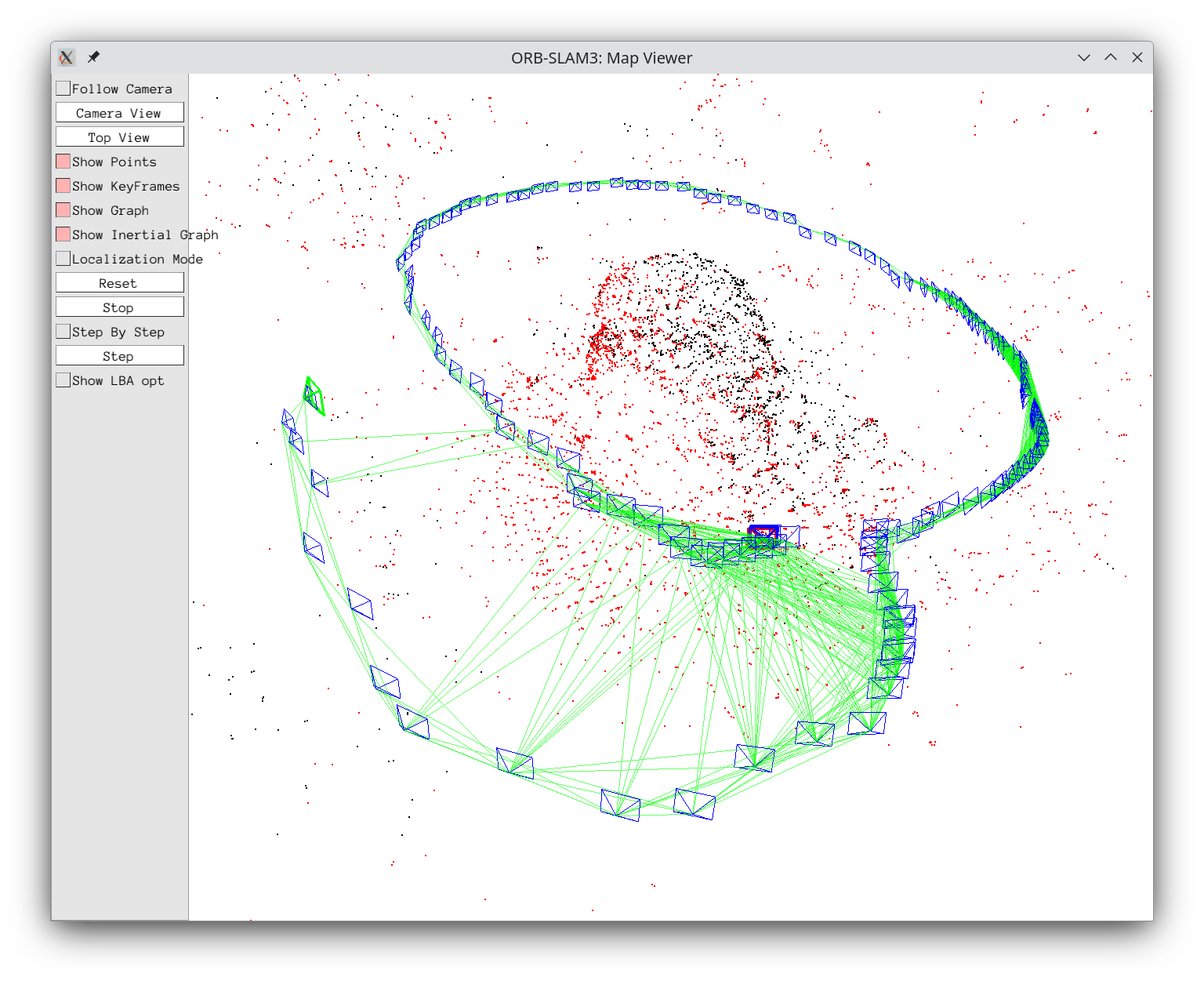
ORB-SLAM 3 Reconstruction
This image shows the keyframes and sparse reconstruction for my Beetle dataset.
Copy the sparse reconstruction to the host computer,
cp map.ply /work/project
Open the map.ply file in MeshLab, CloudCompare or a tool of your choice
ORB-SLAM 3 can work with unrectified images but for simplification of processing and to avoid mixing different lens models I chose to rectify images during preprocessing.
Running DROID-SLAM
DROID-SLAM will be run on the same dataset; note that the documentation suggests that you will need at least 12GB VRAM,
git clone --recursive https://github.com/princeton-vl/DROID-SLAM.git
Run my techdemo docker image, make sure to mount the filesystem so that you can access the code just downloaded,
rundocker.sh techdemo /dataInstall the Python venv package if you need it,
sudo apt update
sudo apt install python3.10-venv
Follow the DROID-SLAM installation instructions as below; my techdemo docker image is running CUDA 11.8 so I had to install a version of torch that was built for it,
cd /work/DROID-SLAM
python3 -m venv .venv
source .venv/bin/activate
pip3 install torch torchvision torchaudio --index-url https://download.pytorch.org/whl/cu118
Now edit requirements.txt to remove the top 3 lines that install torch and continue with the installation. I also had to disable build isolation for pytorch scatter,
pip3 install -r requirements.txt
pip3 install moderngl moderngl-window
pip3 install thirdparty/lietorch
pip3 install thirdparty/pytorch_scatter
pip3 install --no-build-isolation --force-reinstall --no-binary=torch_scatter thirdparty/pytorch_scatter
pip3 install -e .
./tools/download_model.sh
Copy test_asym.py and load_settings.py from the DROID-SLAM section of my code repository to the evaluation_scripts directory,
cp /work/slam/droid_slam/test_asym.py /work/DROID-SLAM/evaluation_scripts
cp /work/slam/droid_slam/load_settings.py /work/DROID-SLAM/evaluation_scripts
Run the script,
cd /work/DROID-SLAM
python3 evaluation_scripts/test_asym.py --datapath /work/project/dataset --stereo --ply map.ply
My setup (Ryzen 5 + RTX 3060Ti) takes about 5 minutes to initialise.
If you use the --reconstruction parameter, you may specify
a file to save the reconstruction to, e.g. --reconstruction map.pth
and view it with python3 view_reconstruction.py map.pth
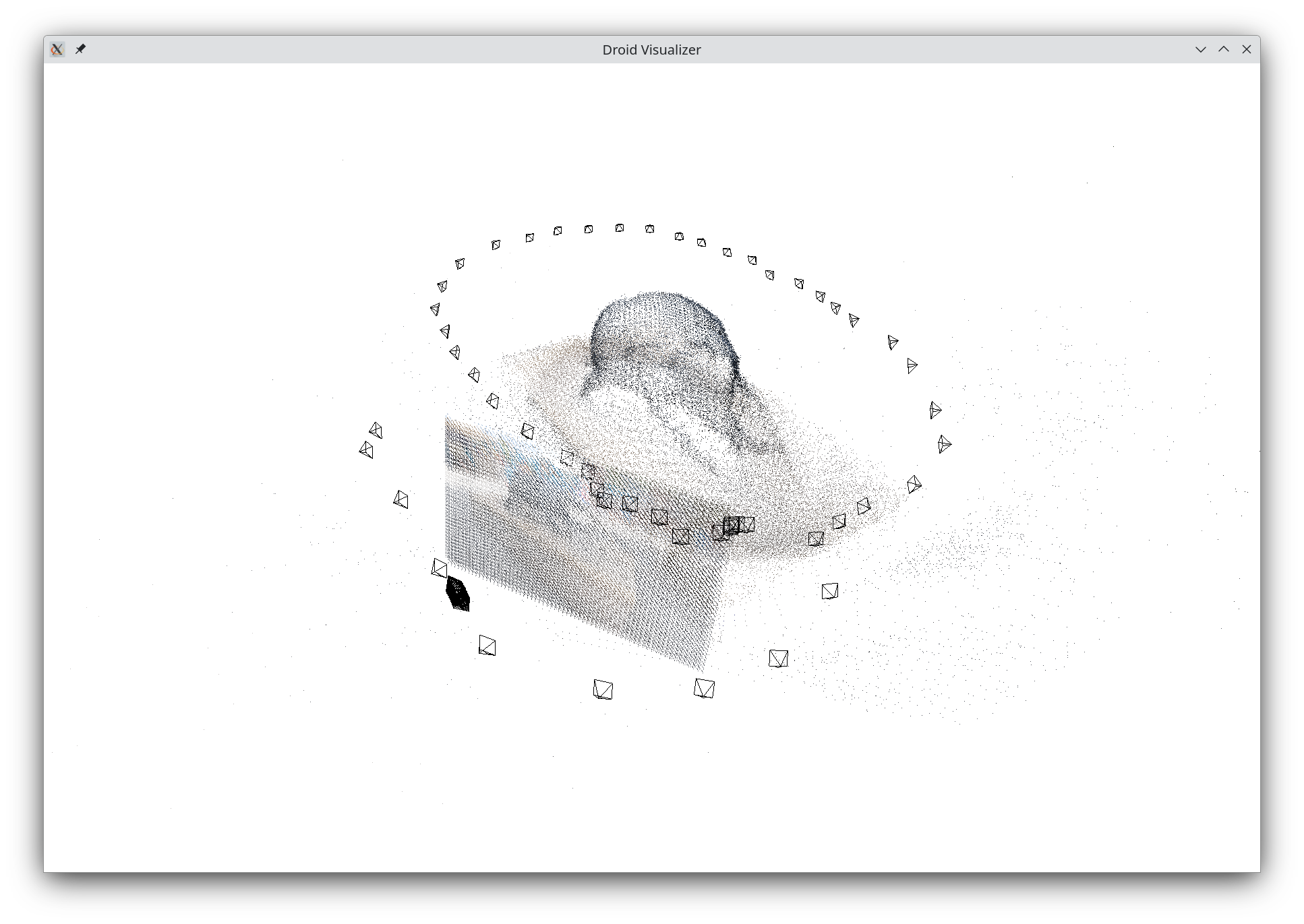
DROID-SLAM running on my Beetle dataset
This example script loads all of the images into memory before processing so depending on how long your video sequence is, you may run out of memory. DROID-SLAM can accept images input one by one which should allow reduced memory consumption.
Copy the map.ply file to somewhere safe, so you can open it in MeshLab, etc.
cp map.ply /work/reconstructions/project-map.ply
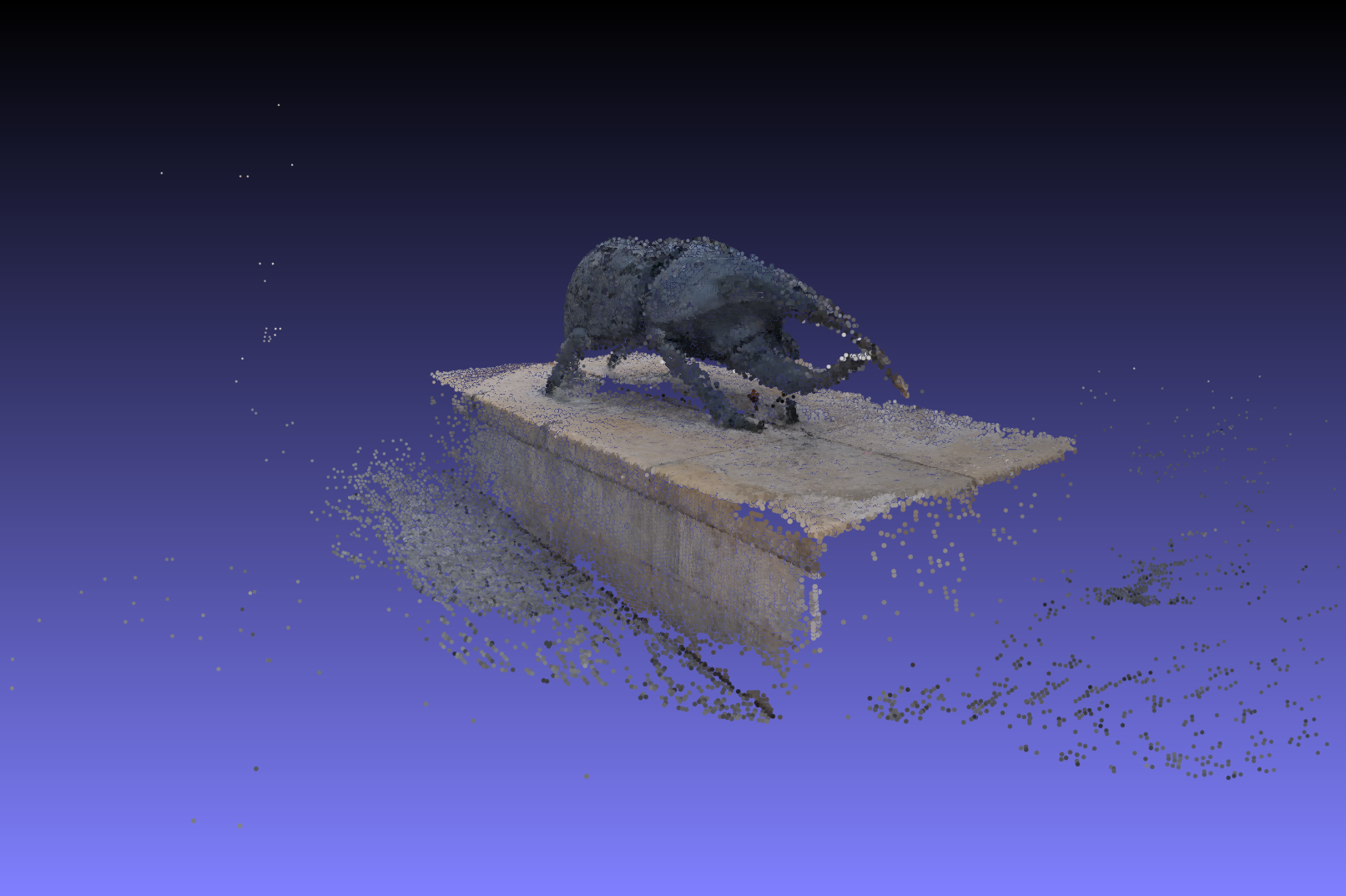
Viewing the Sparse Reconstruction in MeshLab
DROID-SLAM should not be compared to ORB-SLAM 3 by the quality of the visualisation while the algorithm is running, but by the trajectory error, comparisons with known ground truth datasets can be found in the paper. Although DROID-SLAM gives better accuracy it needs more resources than ORB-SLAM, so is less likely to be used when running on an edge device.
Summary
- From sensor inputs SLAM finds poses and produces a map composed of 3D world points.
- SLAM can run iteratively, feeding images as they are captured, and can run real-time; this makes it suitable for robot perception.
- Choice of SLAM algorithm depends on computing resources available.
References
- Johannes Lutz Schönberger and Jan-Michael Frahm, "Structure-from-Motion Revisited", Conference on Computer Vision and Pattern Recognition (CVPR), pp4104--4113, DOI 10.1109/CVPR.2016.445, 2016. pdf
- Carlos Campos, Richard Elvira, Juan J. Gómez Rodrı́guez, José M.M. Montiel and Juan D. Tardós, "ORB-SLAM3: An Accurate Open-Source Library for Visual, Visual-Inertial and Multi-Map SLAM", IEEE Transactions on Robotics, Volume 37, Issue 6, pp1874--1890, DOI 10.1109/TRO.2021.3075644, 2021. pdf
- Zachary Teed and Jia Deng, "DROID-SLAM: Deep Visual SLAM for Monocular, Stereo, and RGB-D Cameras", Advances in Neural Information Processing Systems (NeurIPS), pp16558--16569, 2021. pdf